Website Speed and Core Web Vitals: Why Performance Determines Your SEO Rankings and Revenue

Every extra second your website takes to load is a customer walking out the door. It's also a quiet signal to Google that your site might not deserve a top ranking. Performance used to be a "nice to have" conversation reserved for engineering teams. Today, it's a board-level metric with a name: Core Web Vitals.
This guide breaks down what Core Web Vitals actually measure, why they matter for both rankings and revenue, and the concrete fixes that move the needle.
What Core Web Vitals Actually Measure
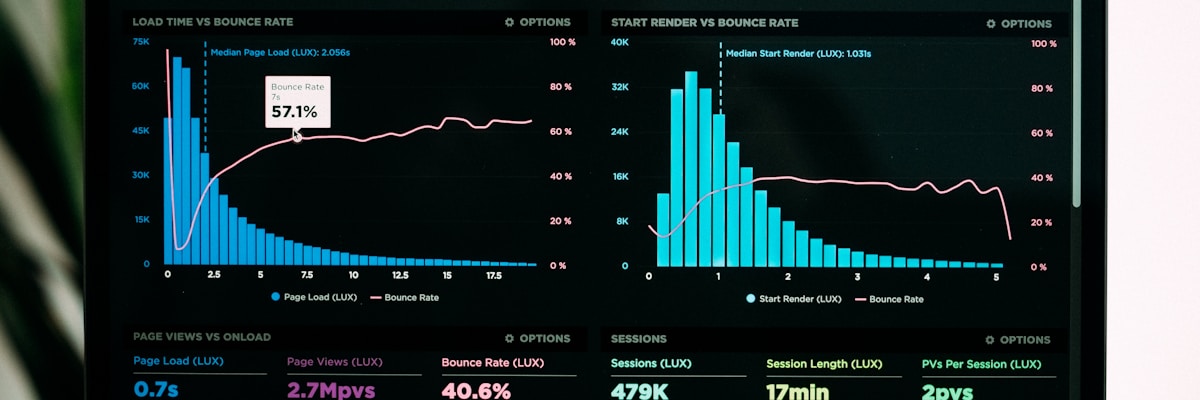
Google's Core Web Vitals distill "does this page feel fast" into three measurable signals:
Largest Contentful Paint (LCP)
How long it takes for the largest visible element—usually a hero image or headline—to render. Google considers 2.5 seconds or less good. This is your first impression, measured in milliseconds.
Interaction to Next Paint (INP)
How responsive the page feels when someone actually clicks, taps, or types. A page that looks loaded but freezes when you click a button fails this metric even if it "loaded" quickly. Google's target is under 200ms.
Cumulative Layout Shift (CLS)
How much content jumps around as a page loads. That moment where you go to tap a button and an ad loads above it, shifting everything down and you tap the wrong thing—that's a CLS failure. Target: under 0.1.
These three metrics replaced a grab-bag of older performance signals because they measure what users actually experience, not just server response time.
Why This Is an SEO Issue, Not Just a UX Issue
Core Web Vitals are a confirmed Google ranking factor as part of the Page Experience signals. That means two pages with identical content and backlinks can rank differently based purely on how fast and stable they feel to load.
But the SEO argument is almost secondary to the business argument:
- Slower pages have higher bounce rates. Visitors leave before content even renders, which tells Google (and your analytics) that the page didn't satisfy the search intent.
- Mobile users are less patient than desktop users, and mobile traffic is the majority of search traffic for most businesses.
- Every layout shift is a small trust violation. Users who get tricked into a misclick by a jumping page are less likely to convert, and more likely to leave.
Performance isn't separate from SEO strategy—it's one of the few ranking factors you have full, direct control over. You can't force competitors to write worse content, but you can absolutely make your site faster than theirs.
The Most Common Causes of Poor Core Web Vitals

Unoptimized Images
Images are consistently the single biggest contributor to slow LCP. A 4MB hero photo straight off a phone, dropped into a CMS at full resolution, will tank load time on its own.
Fixes:
- Serve modern formats (WebP/AVIF) instead of JPEG/PNG
- Resize images to the actual display dimensions, not the original camera resolution
- Lazy-load offscreen images so the browser isn't fetching content the user hasn't scrolled to yet
Render-Blocking JavaScript and CSS
Scripts and stylesheets that must load before the page can paint anything are a classic INP and LCP killer, especially third-party scripts (chat widgets, analytics, ad tags) that a site owner didn't write and doesn't control.
Fixes:
- Defer or async non-critical scripts
- Audit third-party scripts regularly—most sites accumulate tracking tags no one remembers adding
- Split large JavaScript bundles so the browser only downloads what a given page actually needs
Missing Size Attributes and Late-Loading Fonts
CLS problems almost always trace back to content that doesn't reserve space before it loads: images without width/height attributes, ads that inject after the fact, or custom fonts that swap in and reflow text.
Fixes:
- Always specify width and height (or aspect-ratio) on images and embeds
- Preload critical fonts and use
font-display: swapthoughtfully - Reserve space for dynamic content like cookie banners and ads before they load
Slow Server Response and Unoptimized Hosting
No amount of frontend optimization fixes a backend that takes two seconds to respond to the initial request. Time to First Byte (TTFB) sets the floor for every other metric.
Fixes:
- Use a CDN to serve static assets closer to the visitor
- Enable server-side caching for pages that don't change on every request
- Choose hosting that matches your traffic patterns—cheap shared hosting is rarely fast hosting
How to Audit Your Own Site
You don't need expensive tools to get started:
- Google PageSpeed Insights — free, gives you real Core Web Vitals data from actual Chrome users (field data), plus a lab-test breakdown of what's slow
- Google Search Console — the "Core Web Vitals" report shows which URLs on your site are failing, at scale, based on real visitor data
- Chrome DevTools Lighthouse panel — run it locally for a detailed, page-by-page diagnostic with prioritized fix suggestions
Run these on your homepage, your most-trafficked landing pages, and any page tied to a conversion goal (checkout, contact form, pricing). A single slow page in your conversion funnel can undercut everything else on your site.
Conclusion
Performance work doesn't get the same attention as a redesign or a new feature launch, but it's some of the highest-leverage work available: it improves rankings, reduces bounce rate, and increases conversions, often without touching a single word of copy or piece of design.
If your site hasn't had a performance audit in the last year, it's worth doing one—Core Web Vitals thresholds and Google's evaluation criteria evolve, and a site that passed last year isn't guaranteed to pass today.
At Hexed Studio, performance optimization is one of our core service areas—we audit, diagnose, and fix the real bottlenecks slowing your site down, from image pipelines to render-blocking scripts to hosting architecture. Contact us today to get a clear picture of where your site stands.